Native macOS 13.0+ (Ventura, Sonoma, Sequoia) • Apple Silicon & Intel

Close All Open Apps on Mac.
With Exactly 1 Click.

Tired of right-clicking every icon in your macOS Dock or hammering Cmd + Q dozens of times? CloseAll terminates all running user applications in under 200ms with smart system protection, instant undo, and zero bloat.

$ git clone https://github.com/contactshiva/MacAppCloseAllOpenApp.git
macOS Sonoma Desktop • CloseAll Simulation
    100%

Closed 6 Applications

Finder & Background Services Preserved

💡 Interactive Demo: Click the red ⚡ CloseAll icon in the Dock below to test!

The Missing Button in macOS

Every Mac power user deals with 20+ open windows slowing down their machine. CloseAll replaces manual repetition with pure instant speed.

1-Click Dock Execution

Keep CloseAll.app pinned to your Dock. A single tap quits all open applications with smooth audio chime and floating HUD feedback. Hold Option + Click to open Preferences.

Menu Bar Resident Dashboard

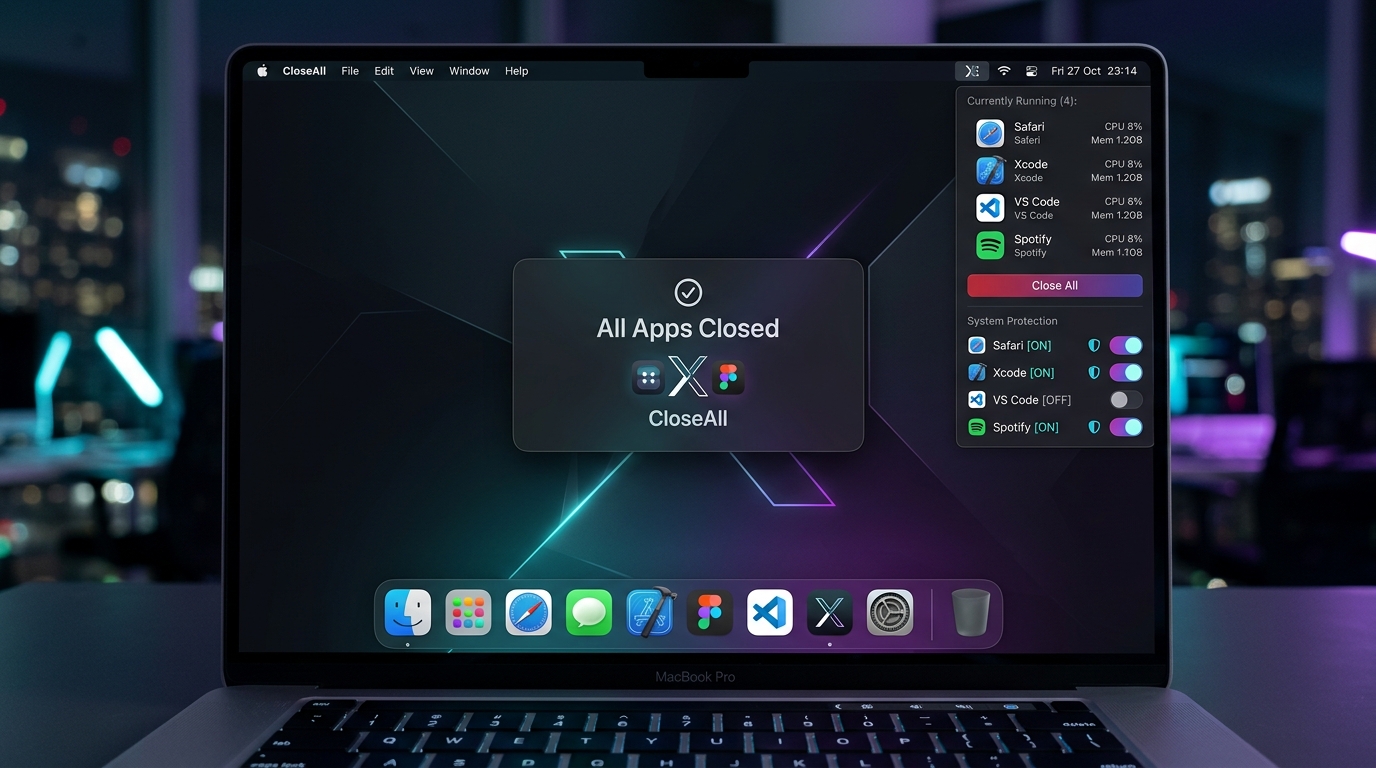
Sits quietly in your top menu bar displaying the live count of active apps. Click to expand a sleek popover with process icons, shield toggles, and instant Quit All / Reopen controls.

Finder & System Daemon Safe

Never crash your desktop. CloseAll strictly targets .regular user processes and whitelists Finder and critical macOS daemons (Dock, WindowManager, Control Center) by default.

1-Click Undo & Reopen

Accidental trigger? Hit the Reopen button in the menu bar or run closeall --undo from Terminal to restore the exact set of applications terminated in your last session.

Multi-Stage Termination

Sends graceful Cocoa terminate() signals first to let apps prompt for unsaved changes. If background processes hang, CloseAll dynamically escalates to SIGTERM and SIGKILL.

Terminal, Raycast & Alfred CLI

Full-featured closeall command-line executable. Script your Mac, automate bedtime desktop cleanup, or bind it to Raycast, Alfred, and Automator shortcuts.

100% Pure Swift 6 & SwiftUI

We believe desktop utilities should be light as a feather. CloseAll contains zero Electron containers, zero Python interpreters, and zero external NPM bloat.

  • Sub-15MB footprint: Instant launch with negligible RAM consumption.
  • Apple Silicon Native: Compiled for M1, M2, M3, M4 and Intel x86_64.
  • Granular Whitelisting: Shield music apps, IDEs, or meeting tools with 1 tap.
  • Privacy First: 100% local execution. Zero network calls, zero tracking telemetry.
Get CloseAll Free View Full Architecture
CloseAll for macOS UI Screenshot

CloseAll vs Manual macOS Workflows

See why thousands of developers switch to CloseAll over standard macOS dock right-clicking.

Capability ⚡ CloseAll for Mac Right-Click Dock Icons Cmd+Tab / Cmd+Q Cycle Activity Monitor
1-Click Execution Yes (1 Click) No (2 clicks per app) No (Manual cycle) No (Multiple menus)
Time to Close 10 Apps < 200 ms ~30 seconds ~15 seconds ~45 seconds
Visual Floating HUD Yes (Audio + HUD) None None None
Undo / Reopen Session Yes (1 Click) No No No
App Whitelist Shield Yes (Custom rules) No No No
Finder & Daemon Safety Automatic Safety Manual Caution Manual Caution High Crash Risk
Menu Bar Resident Yes (Live Count) No No No

Simple Setup in Seconds

Download the disk image or installer and start quitting apps in seconds.

1. Drag to Applications

Open CloseAll.dmg and drag CloseAll.app into your /Applications folder. Drag it to your macOS Dock for permanent 1-click access.

2. First Launch Approval

Because CloseAll is 100% free open-source software, on first launch right-click CloseAll.app in Finder, choose Open, and confirm. Or run in Terminal:

xattr -cr /Applications/CloseAll.app

3. Terminal & Shortcuts

Access CloseAll from anywhere in Terminal, Raycast, or Alfred:

closeall --quit-now
closeall --undo
closeall --force

Common Questions

Everything you need to know about CloseAll for macOS.

How does CloseAll close all open applications with 1 click?
When you click the CloseAll icon in your Dock or the Quit All button in the Menu Bar popover, CloseAll invokes the native macOS Cocoa workspace APIs to enumerate all active foreground applications. It skips Finder and protected system daemons, sending instant termination requests to every other open application concurrently.
Will CloseAll close Finder or crash my macOS system services?
No. CloseAll strictly targets .regular user processes and excludes Finder (com.apple.finder) by default. System daemons like WindowManager, Dock, and Control Center are completely ignored.
What happens to applications with unsaved documents?
CloseAll initiates a graceful Cocoa terminate() request first. This allows document-based apps (Pages, Numbers, TextEdit, Photoshop) to prompt you to save your work before exiting.
Can I undo or restore applications that were just closed?
Yes! CloseAll saves the bundle identifiers and file paths of all applications terminated in the last session to a local cache. Clicking Reopen in the menu bar popover or executing closeall --undo restores all of them in a flash.
How can I whitelist an app like Spotify or Slack so it never closes?
Simply click the CloseAll icon in your menu bar. Next to each running app, you will see a shield icon. Clicking the shield toggles protection ON. Protected apps will be safely skipped during every Close All operation. You can also edit bundle IDs directly in Preferences.
Is CloseAll for macOS free?
Yes, 100% free and open source under the MIT license. There are no paywalls, in-app purchases, or ads. The entire codebase is hosted publicly on GitHub.

Ready to Declutter Your Mac Desktop?

Download CloseAll now and experience blazing-fast 1-click desktop clearing on Apple Silicon & Intel.

Download CloseAll for Mac Free View GitHub Repository
Home Services Products Blog Contact