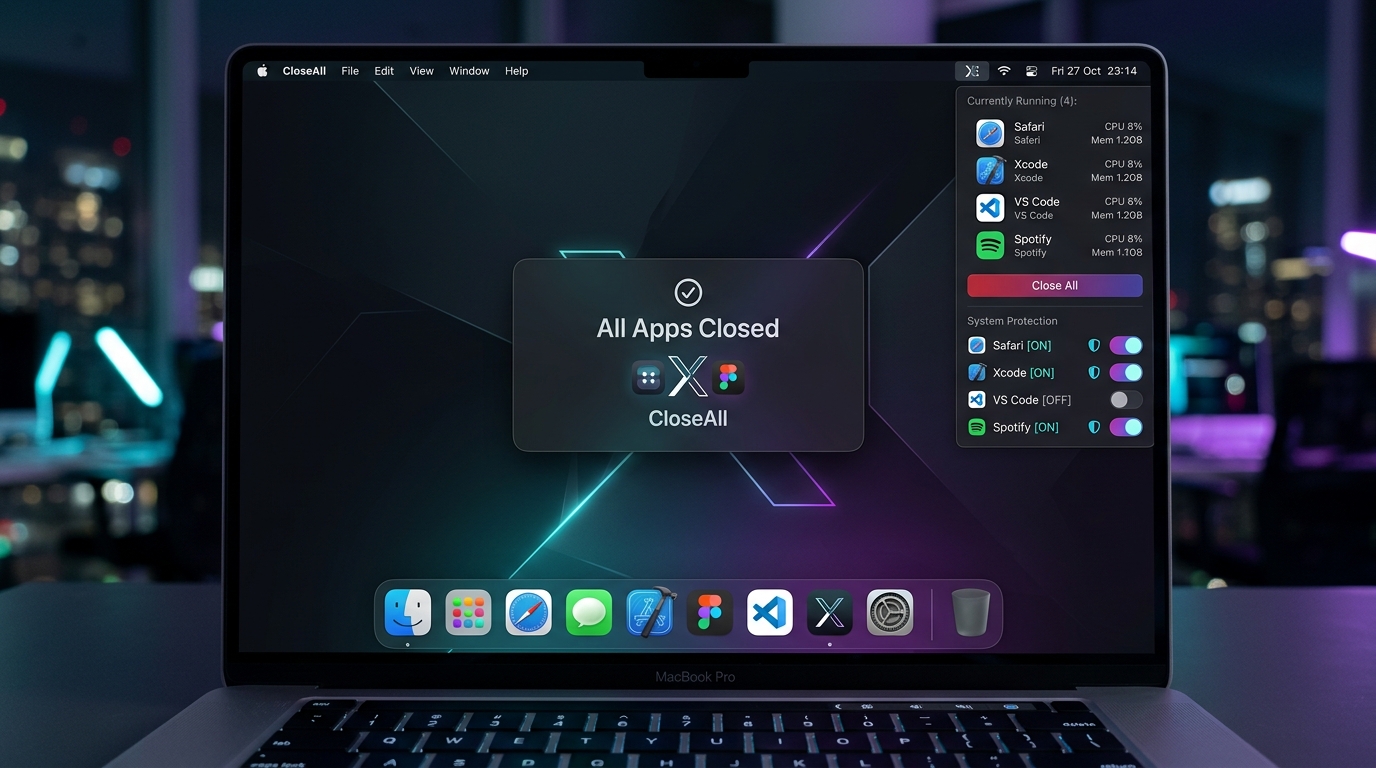
Interface Showcase
Platform Preview & Features
Direct view of the running application interface, showing active dashboards and core system screens.
CloseAll for macOS gives power users, developers, and creative professionals a blazing-fast, single-click solution to close all running applications at once. Instead of right-clicking every individual Dock icon or cycling through Cmd+Tab dozens of times, CloseAll terminates all running user applications in under 200ms. It features smart system protection (Finder and macOS system daemons are safe), flexible app whitelisting with shields, a floating feedback HUD, multi-stage safe exit with SIGTERM/SIGKILL fallback, an instant Undo/Reopen feature to restore apps closed by mistake, and a native command-line interface for Raycast, Alfred, and Automator shortcuts.
Visit Live PlatformDirect view of the running application interface, showing active dashboards and core system screens.
A closer look at the core functional modules driving this application.
Single click on the Dock icon terminates all active user applications immediately with floating HUD feedback.
Live active app count badge with process icons, shield toggles, and Quit All / Reopen buttons.
Finder is protected by default. Never touches WindowManager, Dock, Control Center, or macOS daemons.
Restores all applications closed in the previous session with a single click or `closeall --undo`.
Shield your music apps, IDEs, or communication tools from ever being closed via one-tap shields.
Integrates seamlessly with Raycast, Alfred, Automator, and Terminal via the bundled `closeall` executable.
Our solutions can be white-labeled, hosted on-premise, or customized to match your current business datasets.
Talk to Sales Team